
Signals Overview
Signal Intelligence is your always-on competitive monitoring and trend detection engine. It aggregates data from multiple sources to surface actionable content opportunities, competitive moves, and emerging trends relevant to your brand.
What Signals Detects
Section titled “What Signals Detects”CXOps monitors five types of signals:
| Signal Type | What It Finds |
|---|---|
| Keyword Gap | Keywords your competitors rank for that you don’t — opportunities to fill content gaps |
| Competitor Content | New content published by competitors you’re tracking |
| Trending Topic | Emerging market trends and topics gaining momentum |
| GEO Mention | Geographic or location-based content mentions relevant to your brand |
| Industry News | Industry-specific news from curated RSS feeds |
Each signal includes a title, source URL, key points, publish date, and an opportunity score indicating how actionable it is.
How It Works
Section titled “How It Works”- Configure — Set up the competitors and keywords you want to monitor in your signal configuration.
- Monitor — CXOps runs background refresh jobs to scan for new signals based on your configuration.
- Review — New signals appear in your Signal feed with type badges, opportunity scores, and source metadata.
- Act — Activate a signal to create a Cortex project, or dismiss it if it’s not relevant.
Signal Feed
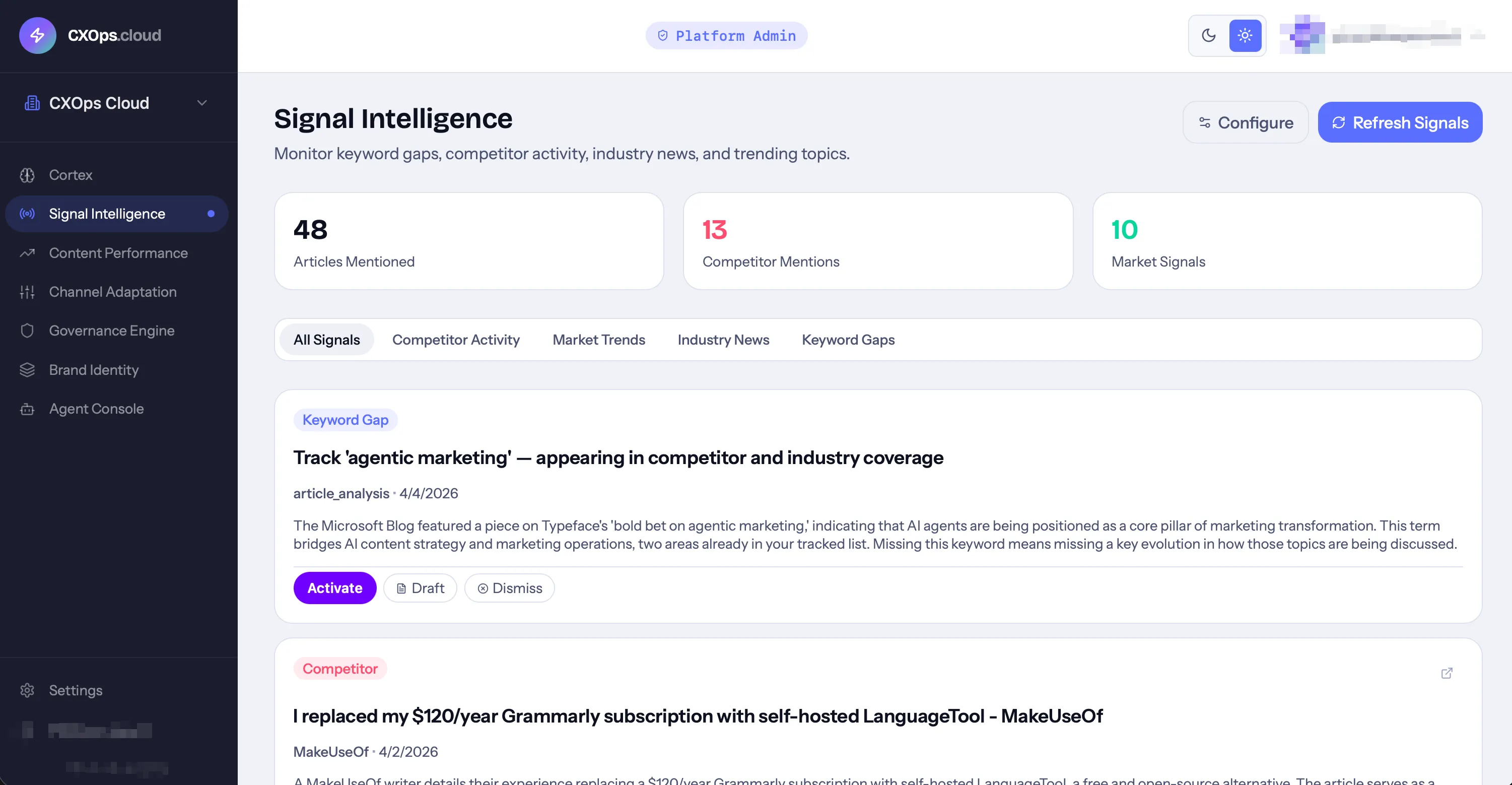
Section titled “Signal Feed”The Signal feed is your central view of all detected intelligence. It includes:
- Stat cards at the top showing total signals, breakdown by type, and average opportunity score
- Signal list with type badges, dates, and source information
- Filters by signal type and status (Open, Acted On, Dismissed)
- Quick actions to view details, activate, or dismiss each signal
Signal Status
Section titled “Signal Status”Each signal has a status that tracks your response:
- Open — newly detected, awaiting your review
- Acted On — you activated this signal (a Cortex project was created)
- Dismissed — you reviewed and decided not to act on it
Refresh Frequency
Section titled “Refresh Frequency”Signal refresh cadence is configurable per deployment (typical options are weekly, daily, or real-time). Manual refresh is always available.
From Signal to Content
Section titled “From Signal to Content”The key workflow in Signals is the Activate action. When you activate a signal:
- CXOps creates a new Cortex project named “Signal: [signal title]”
- The signal’s context, URL, and key points are injected as source material
- A draft is automatically generated informed by both the signal data and your brand identity
- The signal status updates to “Acted On”
This creates a direct pipeline from market intelligence to brand-aligned content.