
Control Overview
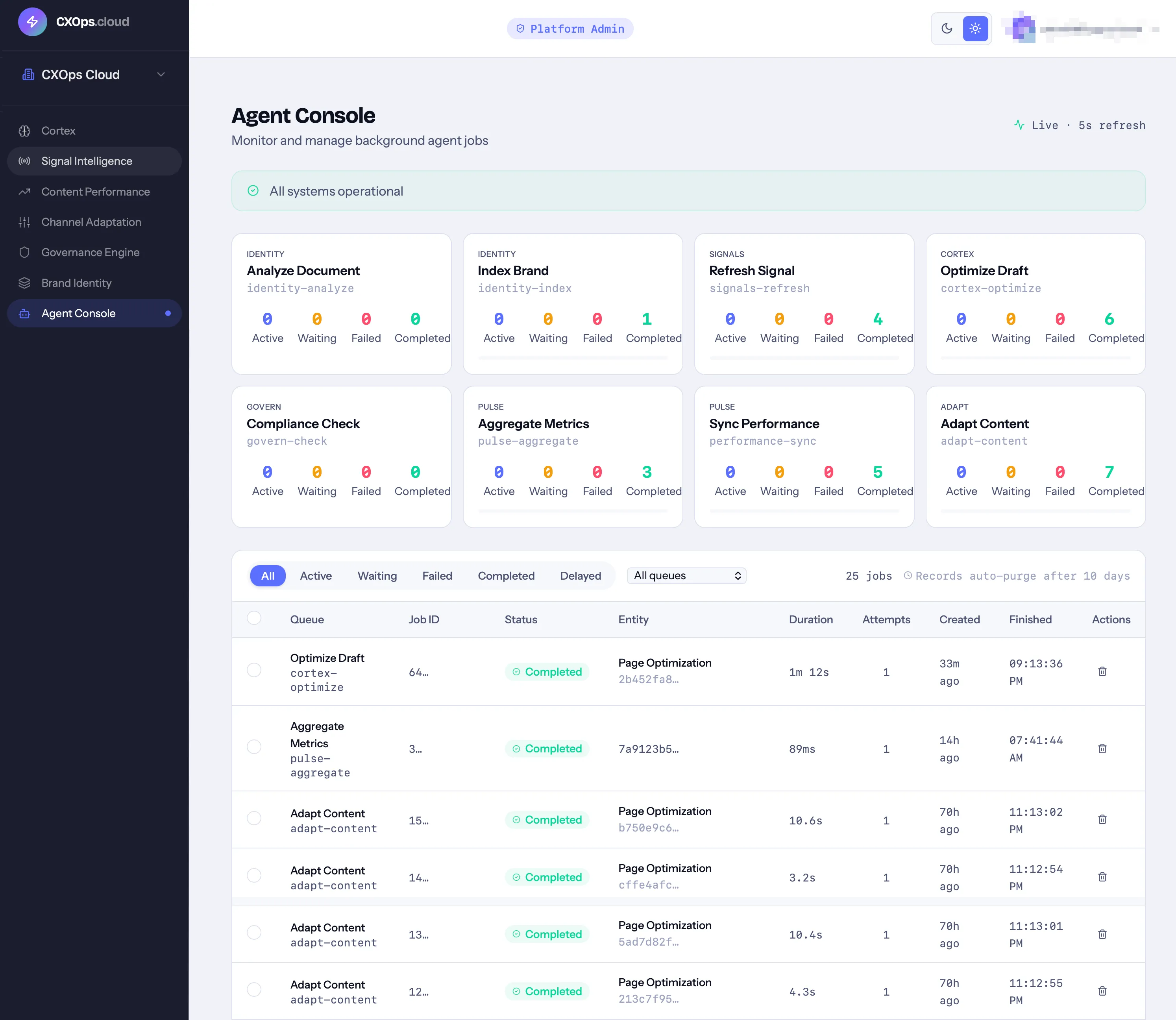
Control is the orchestration console for CXOps Cloud. It gives you real-time visibility into all background AI jobs across the platform — content generation, brand analysis, signal refresh, compliance checks, and more.
What Control Shows
Section titled “What Control Shows”Every AI operation in CXOps runs as a background job. Control surfaces all of them in one place:
Queue Stats
Section titled “Queue Stats”Stat cards at the top show job counts for each product queue:
| Queue | Module | What It Processes |
|---|---|---|
identity-analyze | Identity | AI extraction from uploaded brand documents |
identity-index | Identity | Vector embedding of brand guidelines |
signals-refresh | Signals | RSS feed polling, DataForSEO API calls |
cortex-optimize | Cortex | Content generation, SEO/GEO analysis |
govern-check | Govern | Compliance checks |
pulse-aggregate | Pulse | Metric aggregation and trends |
performance-sync | Pulse | GA4 data sync |
adapt-content | Adapt | Channel adaptation generation |
Each stat card shows:
- Active, waiting, failed, completed, and delayed job counts
- A progress bar showing the percentage of active jobs
- Total job count
Health Banner
Section titled “Health Banner”A system health indicator at the top of the page:
- Red alert — failed jobs exist, with a count and “View failed” button
- Blue info — active or waiting jobs are processing, with counts
- No banner — all systems healthy, no pending work
Job Management
Section titled “Job Management”Filtering
Section titled “Filtering”Filter the job list by:
- Status — All, Active, Waiting, Failed, Completed, Delayed
- Product — Identity, Signals, Cortex, Govern, Pulse, Adapt
- Search — find jobs by entity name (project name, document name, signal title)
Job Details
Section titled “Job Details”Each job in the list shows:
- Job ID
- Queue and product
- Job type
- Status
- Entity name (resolved to a human-readable name)
- Progress percentage
- Fail reason (for failed jobs)
Batch Operations
Section titled “Batch Operations”Select multiple jobs for batch actions:
- Retry — requeue selected failed jobs
- Purge — delete selected jobs
- Clear completed — remove all completed jobs from the list
Job Lifecycle
Section titled “Job Lifecycle”Jobs move through these states:
- Waiting — queued, not yet picked up by a worker
- Active — currently being processed
- Completed — finished successfully
- Failed — encountered an error
- Delayed — scheduled for future processing
Failed jobs can be retried from Control. Each job tracks the number of retry attempts and the specific error message.
When to Use Control
Section titled “When to Use Control”- After triggering batch operations — monitor progress when you’ve started multiple content generation jobs
- Debugging failures — check fail reasons when content generation, compliance checks, or signal refreshes don’t complete
- System health monitoring — keep an eye on queue depths to understand platform load
- Clearing completed work — periodically purge completed jobs to keep the console clean
© 2026 Ambient Cortex LLC. All rights reserved.