
Identity Overview
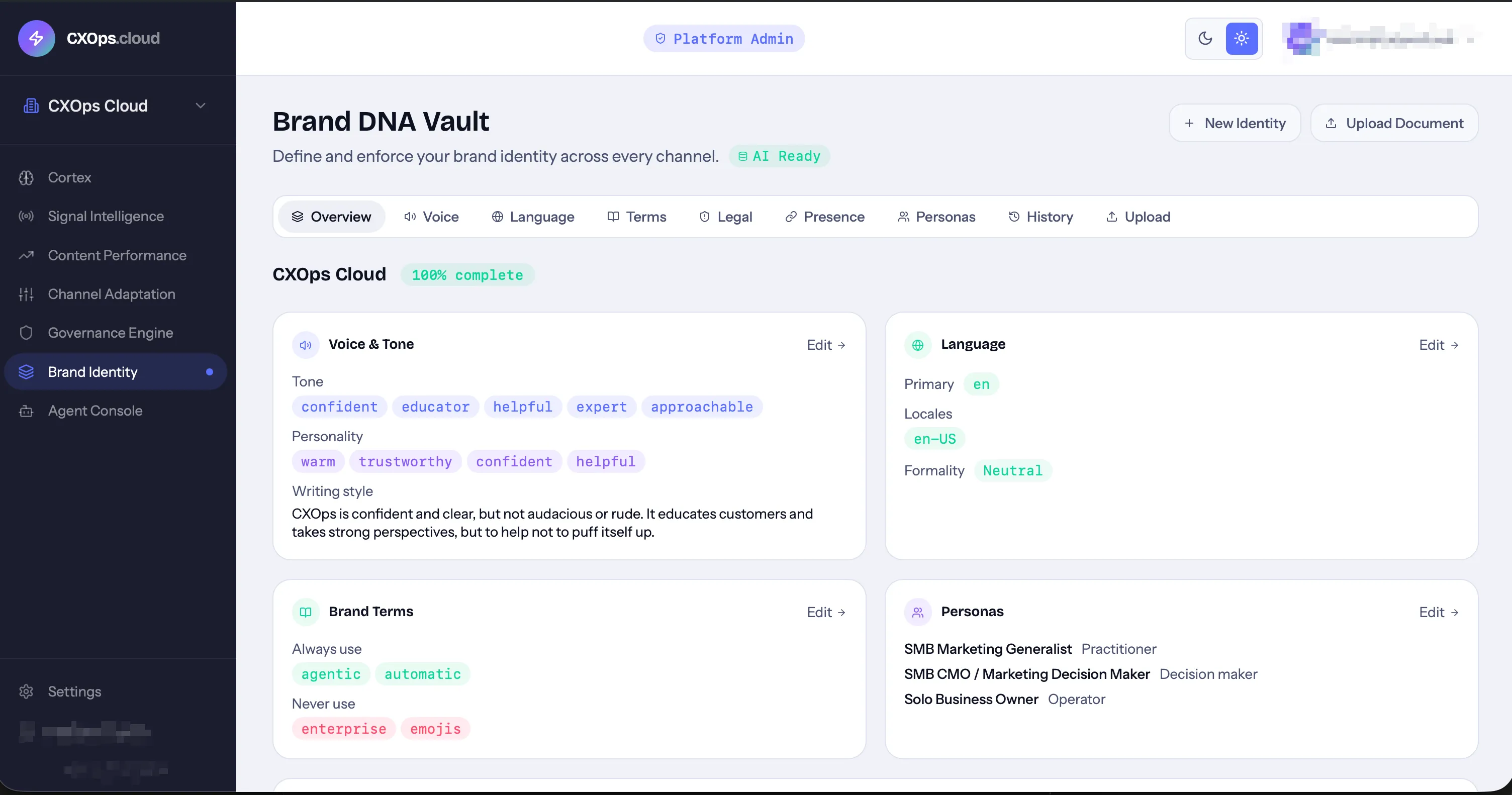
Brand DNA Vault is the core identity layer of CXOps Cloud. It stores your brand’s voice, tone, visual guidelines, terminology, legal constraints, and audience personas as first-class primitives that all other platform modules reference when generating or evaluating content.
Why It Matters
Section titled “Why It Matters”Every module in CXOps Cloud draws from your brand identity:
- Cortex uses your voice and persona settings to generate on-brand content
- Govern checks content against your approved terminology and legal constraints
- Adapt applies channel-specific tone overrides while maintaining your core voice
- Signals filters opportunities through your brand lens
Without a configured brand identity, content generation will still work — but it won’t be tailored to your brand.
What You Define
Section titled “What You Define”Brand DNA Vault is organized into several areas, each accessible via tabs in the Identity interface:
| Tab | What It Stores |
|---|---|
| Voice | Personality traits, tone, writing style |
| Language | Primary language, locales, formality level (formal, neutral, casual) |
| Terms | Approved terms (green-light) and prohibited terms (red-light) |
| Legal | Compliance rules — hard constraints (must-follow) and soft constraints (should-follow) |
| Presence | Website URL and social handles (LinkedIn, Facebook, Instagram, X, Bluesky) |
| Personas | Target audience profiles with motivators, pain points, and messaging preferences |
| History | Immutable version history of all changes to your brand identity |
| Upload | Document upload for AI-powered extraction of brand guidelines |
Getting Started
Section titled “Getting Started”You have two paths to set up your brand identity:
-
Upload existing guidelines — Upload a PDF, DOCX, or TXT file containing your brand guidelines. CXOps uses AI to extract voice, tone, language preferences, and terminology automatically. Learn more.
-
Manual entry — Fill in each tab directly using the forms provided. This gives you full control over every setting.
AI Readiness
Section titled “AI Readiness”After your brand identity is saved, CXOps indexes it using vector embeddings. This enables semantic matching for compliance checks and content generation. Look for the AI Readiness badge on your brand profile — once it shows as ready, your identity is fully indexed and available to all modules.
Completeness Score
Section titled “Completeness Score”The Identity interface shows a visual completeness score indicating how thoroughly your brand profile has been configured. A more complete profile results in better content generation and more accurate compliance checks.
Version History
Section titled “Version History”Every change to your brand identity creates an immutable version snapshot. The History tab shows who changed what and when, giving you a full audit trail. Versions are never deleted.
Multi-Brand Support
Section titled “Multi-Brand Support”When the deployment is configured for multiple workspaces, each workspace has its own independent brand identity. This is essential for managing multiple brands — each gets its own voice, personas, and terminology without cross-contamination.