
AI Recommendations
The AI Recommendations tab in the Cortex draft editor surfaces a prioritized list of brand-alignment and content-quality suggestions for the draft you’re working on. Think of it as a synthetic UI/UX and editorial review of the page — Cortex evaluates your optimized content against established content best practices, then filters those judgments through your brand identity, audience, tone, and any personas you’ve attached.
Unlike SEO Insights and GEO Insights — which score your content against search and generative-engine signals — AI Recommendations focus on the editorial layer: is the CTA clear, does the voice match your brand, are you speaking to the right audience, and what’s missing.
What AI Recommendations cover
Section titled “What AI Recommendations cover”Recommendations are focused on four areas:
- CTA clarity — whether calls-to-action are specific, visible, and aligned with the draft’s goal
- Brand voice consistency — whether tone, phrasing, and word choice match your brand (and any attached personas)
- Audience alignment — whether the content speaks to the intended reader’s level, context, and intent
- Missing content opportunities — sections, examples, proof points, or angles the draft should add
You’ll typically see 4–6 recommendations per draft.
Priority levels
Section titled “Priority levels”Every recommendation has a priority badge:
| Priority | Meaning |
|---|---|
| High | Address before publishing — the recommendation flags something likely to hurt clarity, conversion, or brand fit |
| Medium | Strong improvement worth making in this revision |
| Low | Nice-to-have polish; apply if you have time |
Work top-down by priority. High-priority items are the ones most likely to move the needle on the draft’s performance.
How recommendations are generated
Section titled “How recommendations are generated”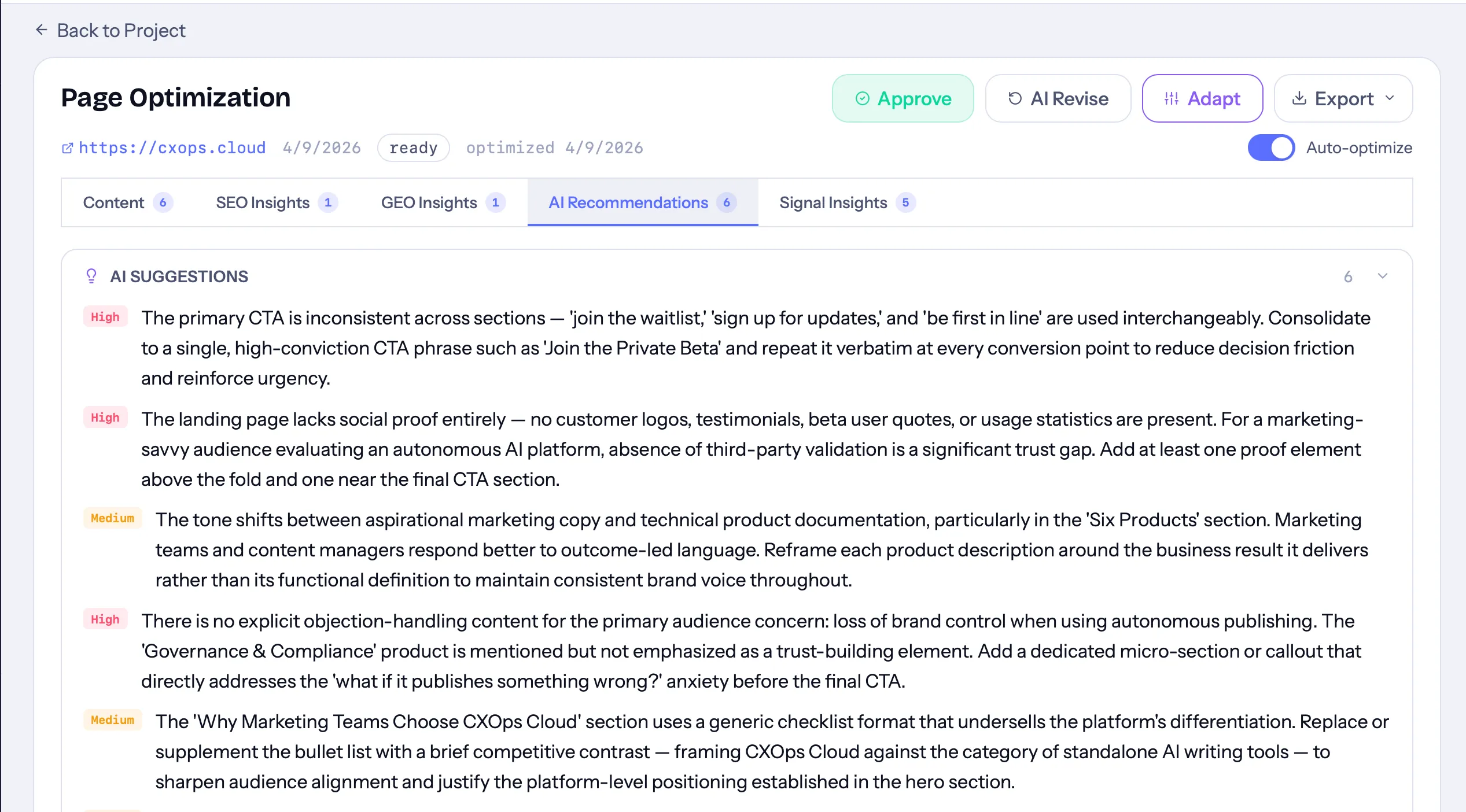
Recommendations are produced automatically during the Generating stage of draft processing:
- Cortex analyzes your source (URL or brief) to detect content type, audience, and tone.
- It generates the optimized sections for your draft.
- A content-analyst agent then reviews those sections against your draft’s audience, tone, and any selected brand personas.
- The agent returns a ranked list of recommendations, which appear in the AI Recommendations tab once processing completes.
The tab shows a count badge next to its label so you can see at a glance how many recommendations are waiting for you.
Using personas to sharpen recommendations
Section titled “Using personas to sharpen recommendations”If you attach one or more brand personas to a draft, Cortex injects that persona context into the recommendation prompt. This produces suggestions that reflect the persona’s voice, vocabulary, and audience — rather than generic best practices.
If you’re consistently getting generic recommendations, check that:
- The draft has at least one persona attached, and
- The persona has voice, audience, and tone fields filled in
See Content Briefs for how to attach personas when creating a draft.
Applying a recommendation
Section titled “Applying a recommendation”AI Recommendations are a read-only checklist — there’s no one-click apply button. To act on one:
- Read the recommendation and decide whether it applies.
- Switch back to the Content tab and edit the relevant section directly in the editor.
- When you’re done making edits, you can request a revision to re-run analysis and get a fresh set of recommendations based on your updated content.
When the tab is empty
Section titled “When the tab is empty”If you see “No recommendations — AI recommendations will appear after analysis,” one of the following is true:
- The draft is still processing. Wait for the status to reach Ready.
- Processing failed. Use the Retry button in the draft workspace to re-queue it.
- The recommendation step returned no usable output (rare). Request a revision to re-run it.
How it relates to the other insight tabs
Section titled “How it relates to the other insight tabs”The Cortex draft editor runs several analyses in parallel — each in its own tab:
| Tab | What it evaluates |
|---|---|
| SEO Insights | Keywords, SERP position, on-page SEO signals |
| GEO Insights | E-E-A-T, AI visibility, citation-readiness for generative engines |
| AI Recommendations | Brand voice, CTA, audience fit, missing content |
| Signal Insights | Behavioral and engagement observations from connected analytics |
Use AI Recommendations for editorial judgment calls; use SEO and GEO for structural scoring; use Signal Insights for performance context from real user behavior.